
 Image 1 of 1
Setup guide — Wedding Large Ceremony Sound System
Package ID WED-LRG-CER. More than 200 guests. Full illustrated instructions are in the printable guide: download the setup guide (PDF).
Setup, step by step
Step 1 — Decide where things go
- Where you put the speakers matters more than any knob you will turn. Walk the space and pick your spots before you unpack a single cable.
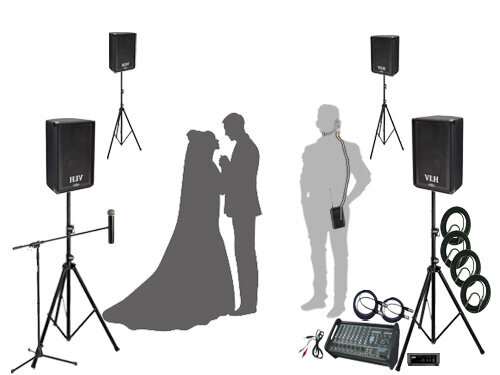
- One speaker at each corner of the seating. The front pair sit level with the couple, just outside the first row. The rear pair sit behind the last row, outside the seating on each side. All four turn inward so their coverage crosses over the guests. Put the mixer table at the back, on one side, just beyond the rear speaker, so you hear roughly what the back rows hear.
- Out of the photographer's field of view. Ask them where they will be shooting from before you commit to a spot.
- Ahead of the microphones. No open microphone should ever be in front of a speaker. This is the main cause of feedback.
- Off the walkways and paths. Set the stands where nobody walks, and where a stand could tip over without hitting anyone.
- High enough to clear the crowd. Each speaker should sit above the heads of your guests, standing as well as seated, so the sound carries over them instead of into them.
Step 2 — Put the speakers up
- Open the stand (LRG-CER-S2-01). Spread the three legs out wide. Set it on level ground.
- Raise the stand (LRG-CER-S2-02). Raise the inner pole until the top of the stand is high enough that the speaker will sit above the heads of your guests. Then lock the height with the safety pin. Push it all the way through, then tighten the tension knob down firmly against it. The pin carries the weight of the speaker.
- Put the speaker on the stand (LRG-CER-S2-03). There is a round socket in the bottom of the speaker. With one person on each side, lift the speaker and slide that socket down over the top of the stand pole. Turn the speaker towards the middle of the guest seating area. Repeat for the other three speakers.
Step 3 — Connect everything
- Plug in the microphone receivers (LRG-CER-S3-01). Run a 5-foot XLR cable from each receiver into its own channel on the mixer — one for the belt pack, one for the handheld. Set the receivers on the mixer table where they can see the people speaking.
- Plug in your music on channel 9/10 (LRG-CER-S3-02). Your kit has a cable with a headphone plug on one end and two quarter-inch plugs on the other. The headphone end goes into your phone or laptop. The two quarter-inch plugs go into the L and R inputs on channel 9/10. Channel 9/10 is the stereo channel, and it is the one to use for music.
- Chain two speakers off each output (LRG-CER-S3-03). Each side of the system runs off one output on the mixer, with the two speakers chained one to the next. Left side: run a cable from Channel A to the first speaker on the left. Then run a second cable out of the other jack on the back of that same speaker, on to the second speaker on the left. Right side: do exactly the same from Channel B — into the first speaker on the right, then out of its second jack on to the other one. Run the cables around the outside edge of the seating. Never run one across the aisle.
Step 4 — Set up the wireless microphones
- Put fresh batteries in both transmitters (LRG-CER-S4-01). Flip the cover open and put in two fresh AA batteries. Do this for the belt pack and for the handheld. Always start the day with new batteries — a set lasts around 5 hours, but a half-used set is not worth the risk.
- Plug the microphone into the belt pack (LRG-CER-S4-02). You have a headset and a clip-on lavalier. They use the same connector and the same belt pack, so you use one or the other, not both.
- Match the channel (LRG-CER-S4-03). Turn on the receiver, then turn on the belt pack. The receiver's display shows a group and channel number. Use the group and channel button on the body pack transmitter to match the group and channel on the receiver. Ie. A:1 , B:3. The handheld is set up exactly the same way on its own receiver.
- Set the gain on the belt pack (LRG-CER-S4-04). Open the battery compartment on the belt pack. Inside, next to the batteries, there is a small round dial with an arrow on it. Turn the arrow to 1 o'clock. That is your starting point for a speaking voice on either microphone.
- Place the microphone on the person (LRG-CER-S4-05). Lavalier: clip it to a lapel, tie, or collar about 6 to 8 inches below the mouth, pointed up at the mouth. Keep it away from necklaces, scarves, and anything that rubs. Headset: loop it over both ears and bring the boom around to the side of the mouth, about 3/4 of an inch away — off to the side, not directly in front, and not touching the cheek, so breathing does not thump. Clip the belt pack to a belt or waistband at the back, or tuck it in a jacket pocket. Run the cable under clothing where you can. The handheld is for readings and anyone who only speaks once. Hold it about a hand's width from the mouth and speak across the top of it, not straight down into it.
Step 5 — Turn everything on and set the volume
- Set the mixer to its starting point (LRG-CER-S5-01). Leave the Amp Assign button out, in the Left/Right position. That is what makes Channel A feed the left speakers and Channel B feed the right. Turn the MAIN knob up to about 8, and leave MON at 0. There are no monitor speakers in this kit. Turn the trim knob at the bottom of every channel you are using to 0 — that is roughly 8 o'clock on the dial. Every channel LEVEL knob all the way down. Leave every Pan knob in the middle. A channel panned to one side will only come out of the speakers on that side. Leave the graphic EQ sliders flat, and the Lo and Hi knobs beside them straight up at 12 o'clock, on both Equalizer A and Equalizer B. Turn the channel EFX knobs down. Reverb on a ceremony microphone makes words harder to understand. Leave 48V phantom power off. The wireless receivers do not need it. You will bring the channel levels up one at a time during the sound check.
- Sound check the wireless microphone (LRG-CER-S5-02). Have someone wear the microphone and stand where the officiant will stand and speak at full volume. Slowly raise the LEVEL knob for the wireless channel until their voice is easily heard from the back row. Check that sound is coming out of all four speakers. Then do the same on the handheld channel, with someone speaking into it at normal reading distance.
- Adjust the EQ settings for the headset microphone (LRG-CER-S5-03).
- Test the music from your own device (LRG-CER-S5-04). Do not skip this one. Plug in the exact phone or laptop you will use on the day and play the exact track you plan to walk down the aisle to. Set the device's own volume to about 80%, then bring the white LEVEL knob at the bottom of channel 9/10 up until the music fills the space. Check that the music and the microphones are at volumes that make sense next to each other. Talk over the music and listen from the back row.
Common questions
Why is nothing coming out of the speakers?
Check in this order: is the mixer plugged in and turned on. Are the master faders at 0. Is the channel LEVEL up. Is the channel muted. Are the speaker cables pushed in and locked at both ends.
Why is the second speaker on one side silent?
The two speakers on each side are chained, so the second one is fed from the first. Check the cable running between them at both ends — the connector should twist and lock. The first speaker will keep working even when that link is bad, which is what makes this easy to miss.
Why is one whole side silent?
Both speakers on that side come off the same output on the mixer, and the second is fed from the first. If the near speaker is silent, both will be. Start at the mixer end, not at the far speaker.
Why is the microphone squealing?
That is feedback. The microphone is hearing the speaker. Turn that channel down right away, then make sure every speaker is in front of the person speaking and move the nearest one further from them.
Why is a wireless microphone cutting in and out?
Press the channel button on the front of that receiver. It will pick a new clear channel. Then set its transmitter to match, using the group and channel buttons. If both microphones are dropping out, do one system at a time so the second one finds a channel clear of the first.
Why won't my phone connect over Bluetooth?
This mixer has no Bluetooth. Music comes in on the cable with the headphone plug on one end and two quarter-inch plugs on the other, which go into the L and R inputs on channel 9/10.
Why is there a hum or buzz?
This is a grounding issue. Move all the power cords onto the same outlet or circuit. Phone and computer chargers can cause this as well. Try unplugging them.
Includes the Following (Or the Equivalent Based on Availability):
(4) Yamaha CBR10 Passive Speakers
Yorkville M1610 Powered Mixer
Shure BLX14/CVL Wireless LAV Transmitter
Apex 575 Wireless Headset Microphone
Shure BLX24/SM58 Wireless Handheld Microphone
(4) OnStage Speaker Stands
(4) 100’ Speaker Cables
(2) 5’ XLR Cables
3.5mm to RCA Pair Audio Cable


